
Frequently Asked Questions | Learn Laugh Play
Find answers to common questions about Learn Laugh Plaand home education UK questions, including how our online learning works, accessing classes, managing your account, and supporting your child’s home education journey.
We support home-educating families across the UK with flexible online learning, and this page is here to help you get started and feel confident using Learn Laugh Play.
Getting Started with Learn Laugh Play
To create an account with Learn Laugh Play, simply select your chosen classes and proceed to checkout. Your account will be created automatically during the payment process — there is no separate registration step required.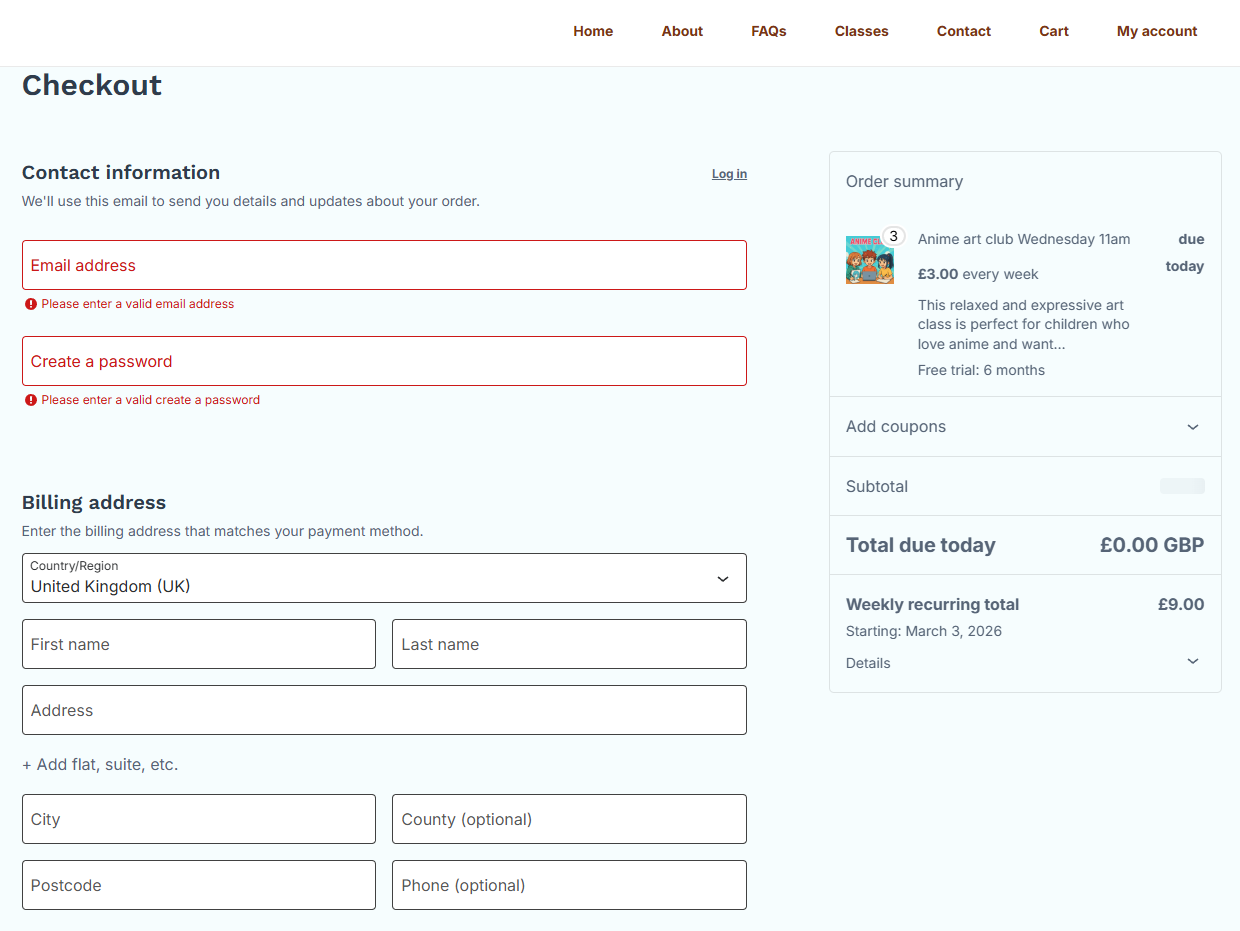
After purchasing classes, you can create a profile for each child in your account area by selecting “Manage child account.” This allows you to assign classes to each child and ensures teachers can identify learners safely during live sessions.
For safeguarding, children need to use their username which is generated at this point rather than their full name when joining Zoom lessons.
IMPORTANT – Before your child joins any lessons for the first time you need to scroll down in “Manage child account” to “Add a child” and add all of your children, so that we know who is signed up for each class. This is for safeguarding reasons and allows us to keep children safe on Zoom and if they message other children on our site.
See diagrams below:
Add your child’s first name or preferred name under “username (login)”.
Add their first name and surname.
Read and agree to the terms and click “Add”.
This will add their profile. It will appear straight away on this page under “Linked Child Accounts”.
Do this for each child.
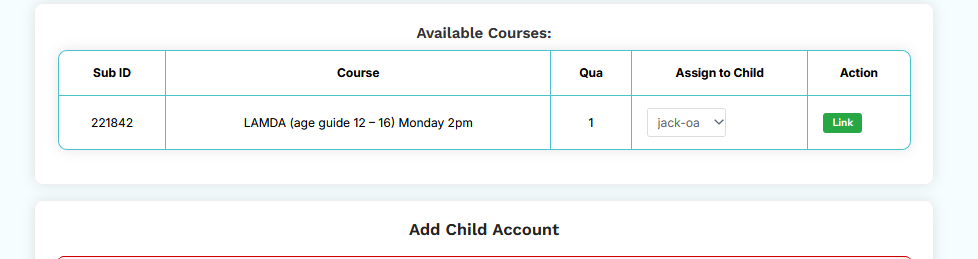
Then scroll up to “Available Courses” and add the correct classes to each child.
This will mean that their classes will appear in their child account area. YOUR CHILD NEEDS TO USE THEIR LLP USERNAME (WHICH WILL BE MADE OF THEIR FIRST NAME FOLLOWED BY A HYPHEN AND 2 LETTERS) IN EVERY ZOOM LESSON. This allows us to know who the children are and keep them safe so it is very important.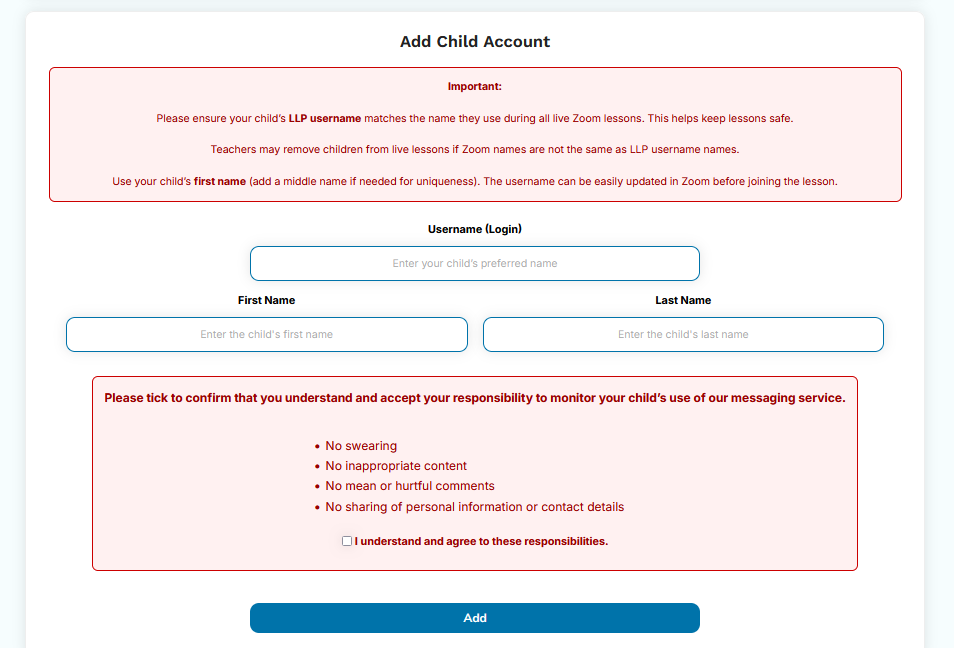
Supporting Children
Yes, Learn Laugh Play supports home-educated children and families across the UK through flexible online learning. Our classes and resources are designed to complement home education and provide both academic support and opportunities for children to connect and build confidence.
Yes! Making friends is at the very heart of what we do — and honestly, no one else in the home education online community prioritises it the way we do.
We’re the only platform that offers a bespoke messaging service for every single one of our classes. That means children can message their classmates directly, both after class and in between classes, all within a safe, contained environment. Lots of children even collaborate on their extra learning activities this way, messaging each other between classes to share ideas and work on things together.
Friendships also grow in our social clubs, which are built entirely around connection rather than curriculum, for example the Feel Good Club and the Scavenger Club. These clubs give children a relaxed, playful space to get to know each other away from the structure of a normal lesson.
Supporting children to socialise and make good friends is one of the core principles of our 9am Club. There is a maximum of twelve children in the 9am Club, who meet four times a week with a teacher who is keen to support their developing social skills, not just their academic learning. That steady routine and familiar group means children really get to know each other and build genuine friendships over time.
Many of our children have gone on to make brilliant friendships through Learn Laugh Play. These things can take a little time to grow, of course, but we do everything we can to support them along the way.
Yes. Our lessons offer lots of different ways to learn, and they’re very relaxed, so children can learn in the way that suits them best.
Many children find it helpful to watch the recordings. It means they can pause when they need to, or rewatch something if they’re not sure about it yet.
Cameras can be turned off during the lesson, as long as they’re on briefly at the start for our visual register. If your child can’t turn their camera on for the register, please get in touch in plenty of time before their first lesson. We’ll arrange a quick meeting with you and them, just long enough to see your child, set up a password, and let their teachers know. After that, the camera can stay off.
Our teachers do their best to offer a wide range of activities that appeal to different kinds of learners. And our age ranges are only guidelines. Unlike schools, we always prefer a child to be learning what they actually need to learn, so they can stay in a group for as long as they need to, right up to the age of 16.
Managing Your Account
You can manage your child’s account through your dashboard by selecting “Manage child account.” From here, you can update details, assign classes, and ensure your child is set up correctly for their sessions. If you do not want your child to message their classmates, you can turn off this function here too.
Accessing Classes and Materials
Once you have purchased a class, it will appear in your “My Courses” area. Each lesson includes a link with Zoom details for live sessions, as well as access to materials, worksheets, and teacher notes.
A recording of the lesson is also available from the evening of the live lesson and viewable for 2 weeks, within your account, allowing your child to revisit lessons at a time that suits them.
Once you have set up your child’s profile, you can use the little person icon top right of website to switch users. Your child’s account area gives them direct access to:
Courses (they can get Zoom codes, recordings and resources here)
Timetable (they can also get Zoom codes, recordings and resources here)
Groups (they can find their classmates here and click on them to send a message
Avatar – they can add their photo or picture (make sure you approve it)
Interactive Banner – they can have a look at other ways to learn and a simple child-friendly user guide to what they can do on the LLP platform.
All Learn Laugh Play classes are delivered live online via Zoom, with recordings of live lessons available for 2 weeks as part of your membership. This gives families the flexibility to attend live sessions or access lessons later at a time that suits their child.
Payments and Membership
Payments are processed securely through the Learn Laugh Play website, and we take data protection seriously. If you need help with payments or accessing a class, you can contact us directly for support. You can cancel your subscription to one or all classes at any time through your account area under Subscriptions
Learn Laugh Play offers classes for children aged 4 through to 16, including GCSE, IGCSE, and Functional Skills levels. Our flexible approach allows children to learn at their own pace, with support tailored to their individual needs and stage of development.
Yes, Learn Laugh Play offers a flexible approach for families. Classes can be selected to suit your child’s needs, and options are designed to work alongside your home education routine, giving you control over your child’s learning experience. Having said that, we know from years of experience that staying in a class long term (at least a term) is best for a child’s learning and confidence. Of course, if a class isn’t right, then you should cancel it and we are happy to advise on alternatives. But if the class is the right level, i is a really good idea to stay in order to benefit from the consistency and relationship building.